
 |
 |
|
|
 |
 |
 |
 |
|
|
Phantom CD is a FREE virtual CD/DVD drive.
Use disc images for your CD and DVD backup. Replace your physical discs to avoid wear and tear on your optical drive, and to avoid disc problems resulted from heat, scratch, and dirt. Enjoy reading speed up to 200 times faster than a physical disc, allowing your application and games to start and run faster.
CD-R/RW, and DVD+-R/RW discs have a life span of two to five years. Optical discs commonly used for burning have a recording surface consisting of a layer of dye that can be damaged by heat. The degradation process can result in the data "shifting" on the surface and thus becoming unreadable to the laser beam.
To avoid burning your CD's every few years, copy the CD and DVD's to ISO or BIN/CUE disc images to your hard drive.
Hard drives have their limitations too. However, when you upgrade, it is much easier and faster to copy dozens or even hundreds of disc image files to a new hard drive than to burn dozens of new CD's.
While the speed of computer processor still doubles every two years, we still have to suffer through the slow reading speed of the optical drives. They spin and buzz, and finally open the files we want. Want to open the next file? That's another round of waiting.
Virtual discs give you up to 200 times the speed of an optical drive. Openning a file on a virtual disc is no different from openning a file on the hard drive.
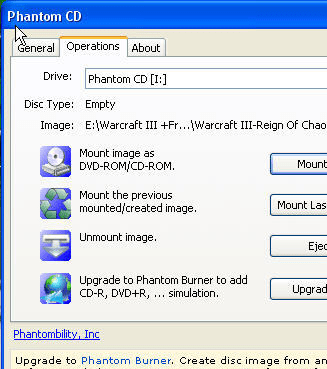
Use Phantom CD to mount ISO and BIN/CUE disc image files. It appears as a DVD or CD disc in Windows, and you use it as if it is a real CD/DVD drive.
|
 |
 |
Visit homepage of Phantom CD
Download Phantom CD 1.5
Popular search terms related to Phantom CD:
dvd copy, virtual drive, iso, drive image, burning, cd burning, cd burn, burn, data backup, reading
|

hard disc format mount image rip disc speed drive iso image virtual drive cue bin to dvd copy data files to dvd burn avi to disc reading faster how to run iso file

Programs related to Phantom CD
|