
Free Downloads Center
e.g. DiskAnalyzer Pro 3.0

Top in this section

R-Studio

Data recovery tool for FAT, NTFS, Ext2FS file systems. File recovery after FDISK, MBR destruction, FAT damaged, virus infection. Dynamic disk support. Damaged RAID reconstruction.

Latest Reviews

Rapid Gallery Creator

Rapid Gallery Creator
Rapid Gallery Creator is an efficient application that can create professional web galleries of your favorite photo albums.

Newsman Pro

Newsman Pro
Newsman Pro, this perfect multi-threaded newsreader is compatible with Usenet text and binary newsgroups.

Subscribe

DiskAnalyzer Pro 3.0 Download

Editor's rating  
Users' rating   (1 votes) Rate it!
License Shareware / $31.95
Downloads 1250
Publisher Crave Worldwide
File size 2800K
Date added 21-May-2009
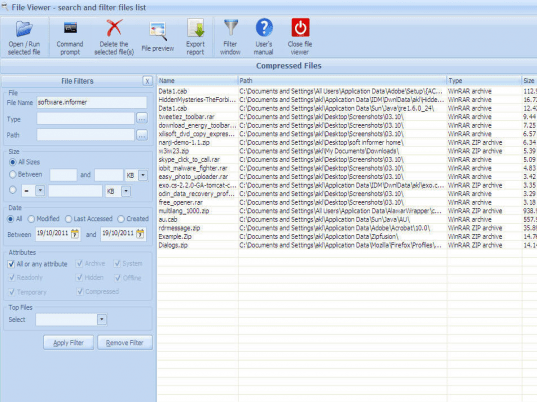
DiskAnalyzer Pro screenshot

Enlarge screenshot

Publisher's description
Editor's review
Submit your review

DiskAnalyzer Pro helps you to locate and remove space wasting files on your hard disk drive. You can see exact disk space utilization with detailed disk space reports.

You can see reports grouped by file types, attributes, file size, ownership, date and time. You can search and filter for all types of files, move or delete unwanted files, copy files to another path, compress files and create a single ZIP file.

All disk space reports can be saved to external files such as HTML, CSV, ASCII and XML. This is useful if you want to keep disk space reports history or import data into any other program.

You can find out duplicate files, junk files, temporary and internet files, images, videos, audio files, zip files using DiskAnalyzer Pro.

Editor review: Reviewer, 2009-06-08 07:55:00

DiskAnalyzer Pro helps you to locate and remove space wasting files on your hard disk drive. You can see exact disk space utilization with detailed disk space reports.

Features: DiskAnalyzer Pro let you find files that are wasting space on your hard drive. Detailed space utilization reports are available through the utility so that you know how exactly space is being used up. To derive better meaning out of the numbers you are able to group the reports by types, attributes, file size, ownership, date and time. Drill down to find the exact usage. The re-organization that can be taken up include searching and filtering all types of files, move/delete unwanted files, copy files and even compress them to release space. Reports can be saved in HTML, CSV, ASCII and XML and can be exported to other applications if need be. Duplicate, junk files, internet temporary files, images, audio, video files can be easily found.

The utility lets you specify your search terms and find the files and folders you need to. Find those big files or the oldest files that are not in use much. Clear them for additional space on your HDD. Find the zero sized files and all kinds of temporary files easily. Media files in themselves tend to be large files. Find out if they are needed or there are unnecessary duplicates lying around. A command-line scanner can be used to perform a disk search from the command-prompt and create a saved disk report archive. This can be later opened with DiskAnalyzer Pro for detailed disk space analysis. You can use any scheduling program to schedule the disk search using command-line scanner. You can get a all folders and subfolders report that shows you all folders and subfolders and what space they occupy.

Overall: A good and effective analysis tool that is easy to use.

Visit homepage of DiskAnalyzer Pro

Download DiskAnalyzer Pro 3.0


disk space analysis
disk image pro
converting mov files to dvd
disk duplicate
compress video size
audio files to ipod format
convert dvd to mpeg file
avi to dvd compress
dvd to zune video converter
mac dvd audio rip

Programs related to DiskAnalyzer Pro

Copyright © 2001-2009, Free Downloads Center.