
 |
 |
|
|
 |
 |
 |
 |
|
|
Have All Programs In Your Start Menu Become Enormously Numerous?
You bought a computer and started turning it into a habitable thing by installing various useful programs for work and entertainment. But then you opened the Start menu one day and all of a sudden became confused: ‘Where's the program I need in this huge list?'
Catalog - True Solution For Arranging Information
The first librarians have encountered the same problem: ‘How to put great amounts of all this information into order?' Catalogs solved this problem. A catalog allows you to focus on a certain category instead of paying attention to all items. It is possible due to the catalog structure based on the fact that all items have been already sorted by categories. This method turned out to be so good that catalogs continue to serve as a source of trustworthy information even centuries later, in the age of search engines, both for people and for search engines.
The More, The Worse
One huge list makes you look through a lot of unneeded items when you are looking for something. The longer the list is, the more attention and time your search requires. You can observe this oppressive situation on most users' computers, it is enough just to open the ‘All Programs' item in the ‘Start' menu. If it is not the case with you, it is just a matter of time.
What To Do?
So how can you solve the problem of your menu being overfilled with various programs? Restrict your needs? No need to do that! The program Start Menu Tuner will easily solve your problem. Use it to create program categories you need and sort your programs by them.
Result - Quick Access To Any Program
What will you get as a result? Now you will not fall into a stupor at a mere sight of a large choice when you open the menu. Your choice is easy and visual: you see a category, open it and look at a brief list of programs that does not require a bloodhound's skills. You have made your everyday life yet more simple and comfortable.
|
|
Editor review: Reviewer, 2009-06-08 07:41:00
The program Start Menu Tuner will easily solve your problem of finding a particular program on the start list when there are too many of them. Use it to create program categories you need and sort your programs by them. You will do it easily and visually.
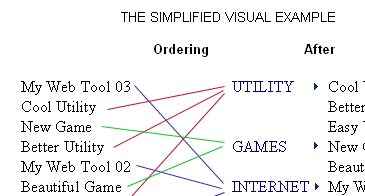
Features: The start menu starts growing as you use your machine more and more. Beyond a point it will become so cluttered that you`ll not be able to find the program you want in that random jumble. If things could be organized by category it`ll be easier to find an item within this category as these lists will be much shorter to look through. This utility does exactly that and lists the start menu programs in two columns. First the category column and next the individual ones are listed. Categories are created as per your need and you identify the programs that go into each category one time.
When finding a particular program it is much easier now. Select the category and then pick the program you want from a much shorter list when you open the menu. Use it to create program categories you need and sort your programs by them. You will do it easily and visually. You will spend minimum effort even if you are new to computers. Straightening the list is drag & drop easy. Drag a program from the left-hand list to any other category. You can create new categories, rename them. When you delete a category, it gets dismissed. Items from this category are not deleted, but moved to the general list. You can change the order of categories, use the Up and Down buttons for that.
Overall: This is a very useful utility. It can really save a lot of confusion.
|
 |
 |
Visit homepage of Start Menu Tuner
Download Start Menu Tuner 1.47
Popular search terms related to Start Menu Tuner:
tuner, restrict, catalog, entertainment, skills, quick time, true, life, order, solution
|

list serve radio tuner start menu replacement dvd problem alexander styopkin dvd burner with menu menu vob flash menu design best pc guitar tuner catalog preview

Programs related to Start Menu Tuner
Folder Marker Pro is your smart assistant, an ardent fighter for your convenience and benefit. This handy shell extension is especially designed for o...
Power Monitor Off , Restart Computer , Log Off , Shut Down , Increase/Decrease Volume , Mute/Un-Mute , Run Program/Open File , Toggle Use Proxy by def...
Folder Marker Home is a powerful helper specially designed for home work. It enables you to quickly change folder color or mark folders to indicate pr...
DirDate is a command line tool that can easily be automated to change file or folder last modification date, creation date or last access date. Change...
Is a useful software that lets you remotely control your computer. The main purpose of this program is to control the computer in the same manner as y...
File Splitter is a tool that will split large file into pieces of any selected size and -- naturally -- with the same tool you can merge these pieces ...
How often do you use Open-Save dialog boxes? It is time to enhance these with AcFolders. It has useful, additional tools, like categorized bookmarks, ...
VanDyke ClientPack is a set of command-line utilities for securely automating file transfer, shell, and public-key administration tasks on Windows, Li...
Disputing display resolution and brightness settings with your colleagues or kids? Stop the squabbles with this program!
Screen Resolution Manager is...
Battery power information is an essential feature on the PocketPC and very important for people depending on their PocketPC's, and not only.
PocketPC...
|