
 |
 |
|
|
 |
 |
 |
 |
|
|
PC Security Tweaker is a security tweaking utility you can use to tweak Windows-based computers. It is compatible with all Windows versions and lets you control which users are allowed to access your PC and the level of access each user may have. You can choose to tweak access to lots of Control Panel applet functions, including Display, Network, Passwords, Printers, System, Add/Remove Programs, etc. You can enforce users to use separate system profile folders and provide them with their own custom shell folders such as Desktop, Start Menu, Favorites, My Documents. Additionally, by tweaking, you can: disable selected Start Menu items, lock and protect disk drives in My Computer, disable the DOS and command prompt, interruption boot keys, real DOS mode, Registry editing, taskbar, task manager, and network access, hide desktop icons, and much more. You can password-protect Windows and restrict users to running specific applications only. Security tweaks can be applied universally or just to specific users. This software also lets you tweak Internet Explorer to secure web browsing.
|
|
Editor review: Reviewer, 2009-11-23 07:18:00
Are you worried about other users accessing, distorting, or misplacing your files, or altering settings relating to display, network, etc? Well, this might be due to the certain right associated with Windows default guest user account. However, if you’re finding it all to be intolerable and wish to limit the content access right for all other users than admin, then a simple solution is to install PC Security Tweaker 9.3. It’s a security tweaking software that aids you in controlling other users’ level of access to your PC. The program allows you to set restrictions different Control Panel functions such as Network, Passwords, System, Printers, Display, Add/Remove Programs, Start Menu items, and more. The program helps you in enforcing users for using different system profile folders, and in providing them their separate custom shell folders like Desktop, Favorites, Start Menu, and My Documents.
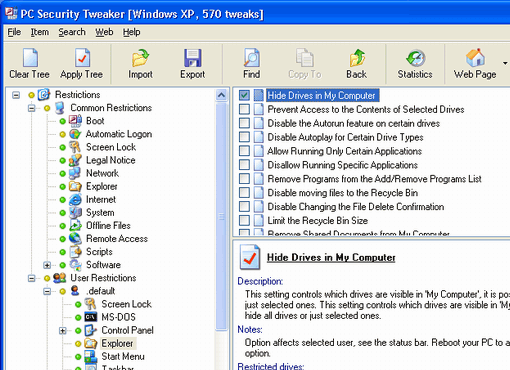
PC Security Tweaker executes presenting an intuitive GUI with simple and effective functions. It provides Restrictions panel over the left where you can set Common Restrictions and User Restrictions, as desired. Using the Common Restrictions segment you can alter and controls functions relating Boot, Automatic Logon, Screen Lock, Legal Notice, Network, Explorer, Internet, System, Offline Files, Remote Access, Scripts, and Software. While the User Restrictions sections aids you in controlling access of default and other guest users. It comprises of various system functions like Screen Lock, MS DOS, Control Panel, Explorer, Start Menu, Taskbar, Dialog Boxes, Active Desktop, Internet, Browser Buttons, and even more. The features and settings relevant to the entire imparted functions are shown over right, where you can mark or unmark them to define restrictions. From specific to all users, you can now control accessibility levels of all separately.
PC Security Tweaker 9.3 is a great system security tweaker software that helps you control all users’ accessibility levels and prevent them from making any unnecessary changes to your system. The utility gets 4.5 rating points for its exclusive and commendable functionality along with smoothly-operable set of options.
|
 |
 |
Visit homepage of PC Security Tweaker
Download PC Security Tweaker 9.33
Popular search terms related to PC Security Tweaker:
tweak, safety, disk manager, restrict, printers, boot, applet, shell, lock, favorites
|

registry tweaker tweak utility cpu tweak lock control panel text menu dos disable windows key usb disk security vista tweak easy command prompt dos manager

Programs related to PC Security Tweaker
Monitor network connections to your shared resources, find out who opens your files over local network. Protect your computer or file server, be notif...
Tired to lose your desktop icons and get them rearranged? Tired to roll back your desktop wallpaper and screen saver after other users you share your ...
Protect your PC from abusive use of removable media with 1st Disk Drive Protector. This software will easily help you enforce whether your users are a...
When you use Windows, open folders, search for files and see pictures, work with different software, use the Internet and online banking to access you...
Protect PC, restrict access to Windows applications and password-protect boot with 1st Security Administrator. This is the best password-protected sec...
Restrict access to Windows applications, protect PC, and password-protect boot with 1st Security Administrator. This is the best professional password...
360 Monitor allows you to monitor employee's activities on all network computers, such as email, instant message, keystrokes, FTP file transfer, websi...
360 Spy Software lets you know EXACTLY what others do on your PC while you are away. It secrectly logs all keystrokes typed, all chats and instant mes...
In the Absolutetoolbar deluxe version you can also add or delete your favorite search links or create a new category. All links are stored in a searc...
|