
Free Downloads Center
e.g. FrameShots 3.0.4

Latest Reviews

Popfax-Printer Internet fax

Popfax-Printer Internet fax
Popfax-Printer Internet fax, makes it simpler to send, receive and print faxes using your Internet connection.

SmartSerialMail

SmartSerialMail
SmartSerialMail, with the smart capabilities of this application you can set up a successful newsletter campaign.

Subscribe

FrameShots 3.0.4 Download

Editor's rating  
Users' rating   (13 votes) Rate it!
License Shareware / $30.00
Downloads 5951
Publisher EOF Productions
File size 1818K
Date added 16-Nov-2009
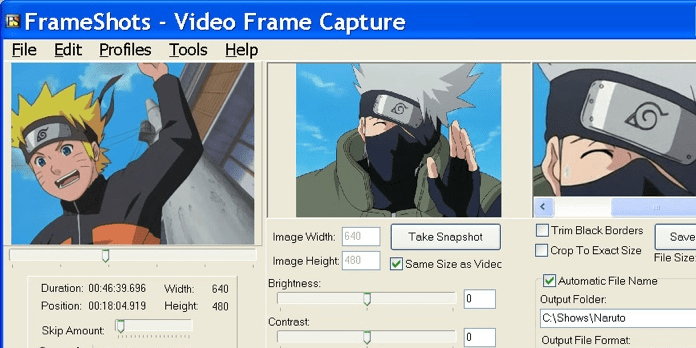
FrameShots screenshot

Enlarge screenshot

Publisher's description
Editor's review
Submit your review

Capture image from video files. FrameShots captures images from videos like your MPEG/AVI/WMV/DivX files etc. files to create high-quality video thumbnails. Features include the ability to navigate frame by frame to find the perfect picture of your movie. It has an option to auto-trim any black borders around your movie stills. The program allows you to capture entire video frames or just the video snapshot images straight to the clipboard for easy transfer to Photoshop or any other image editing software. It also has a batch mode feature which will automatically capture an image from a video at periodic set intervals during the video file. Save video still image to JPG/JPEG and other image formats. Video screenshots can be adjusted for brightness and contrast. Also apply automatic watermarks to your pictures from video.

Editor review: Reviewer, 2010-01-08 08:52:00

You would like to capture image from the video file or prepare a clip from video files and save to video format. Using FrameShots program, you can easily and quickly perform these actions. Apart from these basic features, application also supports batch conversion and watermark features.

Features: The application has a nice user interface, you can perform all the operations from a single user screen. This application has a built-in video player to view your video files. To create frame shots you need to follow simple steps.

Open video file from which you want to extract frames. On screen you can see the video file with details like duration, width and height. To capture image frame define image width and height, set brightness, contrast and sharpen. Click on “take snapshot” button to take snapshot for the video file frame displayed on the screen. You can check / uncheck trim black border to remove black border from the video file. Define output file format and naming convention for the files and folder where you would like to store the converted image file. You can save image in popular formats like JPG, JPEG, GIF, BMP, TIF and PNG format. With Batch mode operation, you can create image for specified interval of time for your video file. Watermark features allow you to add text watermark or image watermark to your image file. You can also extract screenshots of video file using command line interface supported by the application.

Overall: This is a very nice and feature rich utility to create screenshots from your video file in popular image formats.

Visit homepage of FrameShots

Download FrameShots 3.0.4


video snapshots
frames and borders
frame image
video trimming
avi to divx converters
trim mpeg files
ogm divx
convert mpeg wmv
wmv to amr
frame editing

Programs related to FrameShots

Copyright © 2001-2009, Free Downloads Center.