
Free Downloads Center
e.g. Auto Screenshot Maker 2.0

Latest Reviews

Rapid Gallery Creator

Rapid Gallery Creator
Rapid Gallery Creator is an efficient application that can create professional web galleries of your favorite photo albums.

Newsman Pro

Newsman Pro
Newsman Pro, this perfect multi-threaded newsreader is compatible with Usenet text and binary newsgroups.

Subscribe

Auto Screenshot Maker 2.0 Download

Editor's rating  
Users' rating   (1 votes) Rate it!
License Shareware / $15.95
Downloads 265
Publisher AutoScreenshotMaker
File size 2328K
Date added 9-Nov-2009
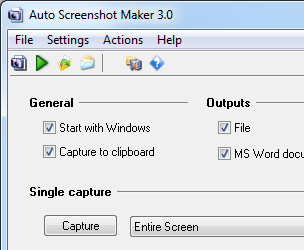
Auto Screenshot Maker screenshot

Enlarge screenshot

Publisher's description
Editor's review
Submit your review

Auto Screenshot Maker is a screen capture tool for Windows users. In just a single click or hotkey press, you can make a perfect screenshot for a website, user manual, or a presentation. The tool captures full screen, active window, selected region – anything! The captured image can be saved to most popular formats, such as BMP, JPEG, PNG, or saved as Microsoft Word document, which is really nice if you are writing the “How-To” document.

The program offers the following features:

* Capture exactly what you need:
o full screen;
o active window;
o selected region;
* Saves captured image exactly as you need:
o as an image file (using most used graphics format - BMP, JPEG, PNG);
o as a Microsoft Word Word document;
* Jump-start your HOW-TO reference in seconds – Auto Screenshot Maker is able to output captured images into a single Microsoft Word document, so the only thing you need to do is to add annotations;
* Capture a series of screens automatically – Auto Screenshot Maker lets you capture the action on the screen in a series of snap shots made over a predefined period of time (e.g. 10 seconds);
* Remove duplicates automatically – Auto Screenshot Maker checks if the current screen shot is similar to the previous and removes the duplicate automatically, so that you don’t have to do it yourself.

Editor review: Reviewer, 2010-01-08 08:27:00

Auto Screenshot Maker is a program useful to take screenshots for entire screen, active window and selection. The application stays in your system tray after installation. This program gives flexibility to take screenshot and simplify process to get screen capture. It captures a series of screens automatically and also removes duplicate screen.

Features: As a professional, you need to take screenshots several times in your daily work. To take screenshot, you need to follow numerous steps like press print screen, open image editor and then save on the hard disc. Using Auto Screenshot maker program you can take screenshot in a single step.

The application allows you to set preferences for your screenshots. It has three tabs namely General, Output and Hotkey. In General tab you can perform settings for single capture and auto capture. In auto capture mode select capture type from the supported list as entire screen or active window, set time interval in second for screen capture. With remove duplicates option, you can set parameters as acceptable area count and acceptable area size to identify. You can also set open the latest capture option and define the path to open the captured file. With output option you can set path to save captured file, define prefixed for file, define file type as JPEG, BMP and PNG. You can also capture images in MS word document. Define hotkeys for capture entire screen, capture active window, capture selection, open the last capture and email the latest capture. Once all the settings are done, you can perform the action as capture, start auto capture, email latest capture etc.

Overall: This is a good utility to take screen capture of your screen, application or windows.

Visit homepage of Auto Screenshot Maker

Download Auto Screenshot Maker 2.0


capture maker
microsoft word perfect
image capture tool
word perfect to word
what is word perfect
presentation maker
screen shot tool
capture screen shot
screen shot capture
word document to jpeg

Programs related to Auto Screenshot Maker

Copyright © 2001-2009, Free Downloads Center.