
Free Downloads Center
e.g. 2D Barcode Image Generator 9.3

Latest Reviews

Rapid Gallery Creator

Rapid Gallery Creator
Rapid Gallery Creator is an efficient application that can create professional web galleries of your favorite photo albums.

Newsman Pro

Newsman Pro
Newsman Pro, this perfect multi-threaded newsreader is compatible with Usenet text and binary newsgroups.

Subscribe

2D Barcode Image Generator 9.3 Download

Editor's rating  
Users' rating   (1 votes) Rate it!
License Shareware / $149
Downloads 772
Publisher IDAutomation.com, Inc.
File size 1732K
Date added 2-Apr-2009
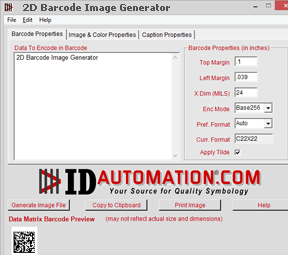
2D Barcode Image Generator screenshot

Enlarge screenshot

Publisher's description
Editor's review
Submit your review

This professional grade application is used to easily create and paste 2D PDF417, DataMatrix ECC200, Aztec, QR Code, Maxicode and many popular Linear barcodes into other Windows applications or generate high quality graphic image files. Commonly used with PhotoShop, Quark and Publisher. Command line options are also available for creating barcodes in DOS. New ease of use features include: settings and properties of the barcode are retained for ease of use, images are easily copied to the clipboard with one click for quick pasting into other applications, and the image file names may be auto generated from the data of the barcode to save time.

Editor review: Reviewer, 2009-11-05 09:58:00

2D Barcode Image Generator is a standalone utility used to create barcode image files one at a time. You can save barcode image to JPEG, TIFF, PNG, BMP and WMF file formats or paste directly into any windows application. Application also has command line options to generate barcode.

Features: Application has a nice user interface. Using this software you can easily create barcode of your choice for your business.

In Barcode properties, enter data to encode in barcode and set barcode properties like Symbol, bar height, x dimension, narrow to wide ratio, white bar space, margins etc. With text and color properties you can set text font, text display on or off, set background color, color for bars and color for text. In Image properties you can set image DPI and orientation and for clipboard image type you can set resolution independent metafile or Bitmap. Caption properties will allows you to enter upper caption and bottoms caption for your barcode. You can specify alignment, font, color, space etc. for you caption text. You can see view image preview to confirm your setting. Once you are satisfied then click on Generate Image file button to save your barcode image into selected image file format. You can also copy image to clipboard and paste into any windows application. If you want to print image then click on Print button to print barcode image.

Overall: This is a nice tool to create your barcode image.

Visit homepage of 2D Barcode Image Generator

Download 2D Barcode Image Generator 9.3


publisher file
data generator
dos file
for photoshop
dos here
how to use dos
maxicode barcode
generate barcode
image publisher
windows photoshop

Programs related to 2D Barcode Image Generator

Copyright © 2001-2009, Free Downloads Center.