
Free Downloads Center
e.g. Magic Sharpener 2.0

Latest Reviews

Rapid Gallery Creator

Rapid Gallery Creator
Rapid Gallery Creator is an efficient application that can create professional web galleries of your favorite photo albums.

Newsman Pro

Newsman Pro
Newsman Pro, this perfect multi-threaded newsreader is compatible with Usenet text and binary newsgroups.

Subscribe

Magic Sharpener 2.0 Download

Editor's rating  
Users' rating   (1 votes) Rate it!
License Shareware / $29.95
Downloads 2904
Publisher ImageSkill Software
File size 4719K
Date added 9-Apr-2009
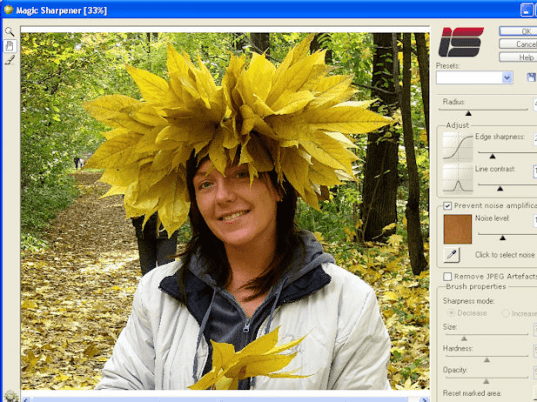
Magic Sharpener screenshot

Enlarge screenshot

Publisher's description
Editor's review
Submit your review

Magic Sharpener is amazing image sharpening Photoshop-compatible plug-in for Windows designed by ImageSkill Software.
It allows a user to get a dramatically improved look of images by perceived sharpness enhancement without increasing color halos and noise. This plug-in increases the contrast along edges and gets more sharpness and contrast to fine details, making them more visible. These latter features can be managed independently, making sharpness enhancement to be content-sensitive in some sense. Since sharpness increasing is a very creative process in which one tries to satisfy demands that in general contradict each other, the separate processing of edges and fine details gives everyone an unbelievably easy way to realize his own flight of fancy. The plug-in is additionally supplied with a new brushed selective sharpening function. These are the main features that differ this plug-in from competitive ones. Everyone dealing with sharpening technique knows how annoying noise exaggeration may be when noise is mixed with image details. Magic Sharpener has a good ability for preventing noise amplification in the process of sharpness increasing; all you need is to switch on the relevant check box, choose an image area where noise is obvious, and adjust the noise level. Magic Sharpener is indispensable in the case of digital cameras whose lens in itself yield a slightly unsharp shot. The plug-in has a stylish user-friendly intuitive multi-lingual interface. A user can choose the language during the plug-in installation but can easily to change it while working with the plug-in. It has simple install and de-install procedures and can work with commercial software like Adobe Photoshop, Adobe Photoshop Elements, Corel (Jasc) Paint Shop Pro and Microsoft Digital Image Suite, as well as free software like IrfanView and XnView.

Editor review: Reviewer, 2009-05-28 10:33:00

Image sharpening Photoshop-compatible plug-in without halos and increased noise.

Features: Magic Sharpener is a plug-in that works with many photo processing software starting with Photoshop. Other photo software this plug-in woks with are Adobe Photoshop 7, CS/CS2/CS3/CS4, Adobe Photoshop Elements 2/3/4/5, Jasc Paint Shop Pro 7/8/9, Corel Paint Shop Pro (Photo) X/ X1/ X2, Corel Photo Paint 11/12, Xara Xtreme, Microsoft Digital Image Suite 2006, Macromedia Fireworks 2004/ 8, Ulead PhotoImpact 8/9/10/11/12. Irfan View and XnView applications are also supported. It allows a user to get a improved look of images by enhancing sharpness. It does not increase side effects like halo effect or increased noise. The application has a brushed selective sharpening. This plug-in increases the contrast along edges and gets more sharpness and contrast to fine details, making them more visible. Magic Sharpener is indispensable in the case of digital cameras whose lens in itself yield a slightly out of focus shot.

Zoom and pan tools lets you view the picture to be improved, very closely and apply local corrections as required. Brush for local sharpness correction and the radius help correct sharpness locally. Edge sharpness and line contrast are couple of other tools that help with edge enhancement. Prevent noise amplification and noise level control helps keep the effects of noise level increase within limits. Remove JPEG artifacts help remove these artifact that get generated sometimes. Brush properties can be defined that decide the kind of effects using a particular brush will have.

Overall: Good and easy to use plug in that fits most photo-processing applications.

Visit homepage of Magic Sharpener

Download Magic Sharpener 2.0


white noise
noise suppression
feeling good
magic camera
magic color
jpeg photo frames
photo effect and filters
photo enhancements
photoshop photo effects
photo image resize digital

Programs related to Magic Sharpener

Copyright © 2001-2009, Free Downloads Center.