

Free Downloads Center
e.g. Magic Skin Filter 1.1

Top in this section

JAlbum

Free popular web photo album generator. Drop folders containing image and movie files onto JAlbum. JAlbum will create thumbnails of your images and display them in index pages in HTML.

Latest Reviews

Popfax-Printer Internet fax

Popfax-Printer Internet fax
Popfax-Printer Internet fax, makes it simpler to send, receive and print faxes using your Internet connection.

SmartSerialMail

SmartSerialMail
SmartSerialMail, with the smart capabilities of this application you can set up a successful newsletter campaign.

Subscribe

Magic Skin Filter 1.1 Download

Editor's rating  
Users' rating   (1 votes) Rate it!
License Shareware / $19.95
Downloads 3435
Publisher PixelApp Studio
File size 1113K
Date added 10-Apr-2009
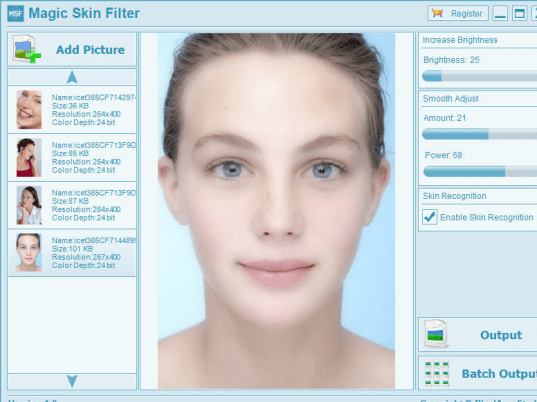
Magic Skin Filter screenshot

Enlarge screenshot

Publisher's description
Editor's review
Submit your review

Beauty your portrait photo, Using Magic Skin Filter! Magic Skin Filter is a powerful and easy to use automatic portrait photo smooth skin software that lets you beauty your portrait photo in seconds! With its intuitive user interface, just a few clicks, you can increase brightness, smooth skin, erase the spots for your portrait photo.
Feature:
1. Smooth skin, increase brightness and erase the spots for your portrait photo.
2. Intuitive user interface.
3. Automatic prevent excessive blur function.
4. Skin recognition engine.
5. Batch processing function.

Editor review: Reviewer, 2009-03-23 03:10:00

Beautify your portrait photos using Magic Skin Filter. Magic Skin Filter is a powerful and easy to use automatic portrait photo smooth skin software that lets you beautify your portrait photo in seconds!

Features: This application helps remove blemishes from the face in pictures that you take. It is a easy to use automatic processing that helps smoothen the skin part of portraits/photos you take. The interface is quite intuitive so that you are able to figure out what each control does very easily. Batch processing is available.

You have a control for adding photos. That sets up thumbnails on a vertical list. Arrow keys let you select the photo you want to process. You can directly select one with mouse click too. The processing starts as soon as a picture is selected. Increase brightness and couple of slider control under smooth adjust is available. They control the overall effect. You can experiment with setting until you get the result you like. Adjust the two smoothness controls until the blemishes disappear from the face of the target picture. There`s a skin recognition feature built in so that the smoothing algorithm is used in the skin areas only. There are built in functions that prevent excessive blurring in the face.

Overall: The processing in the application seems to remove the blemishes and the skin looks fairer. But the overall effect is that of making the face somewhat out of focus as lines get blurred because of the processing. Not a very pleasing effect. The interface is stark, bare of many controls. It is a version 1.0 release thus problems can be anticipated.

Visit homepage of Magic Skin Filter

Download Magic Skin Filter 1.1


photo studio
own skin
under my skin
erase all
magic the
studio plus
six photo
magic batch
photo blur
photo skin

Programs related to Magic Skin Filter

Copyright © 2001-2009, Free Downloads Center.